Building The Perfect Home Golf Practice Set-Up: A Guide For Every Budget
Thinking of doing something pretty special at home? Here are some options and things to consider to help you get started on the right track


It’s something a lot of keen golfers place high up on the priority list: an area at home home (usually the garden) for practice.
If money, or space, were no object, we could go to town on this, and kit ourselves out with the very best simulators and best launch monitors on the market, technology that many of the best players in the world use.
However, just because you can spend a small fortune on the very latest kit, it doesn’t mean that you can’t also create a decent home practice set-up on a much smaller budget; we should know, because we’ve tested a lot.
Space
Let’s start with how much space you need. Even if you have the disposable income to build an all-singing, all-dancing home set-up, you can’t create one if you live in a small flat.
As a guide, you need approximately 10 feet for full swing clearance (height), roughly the same again width-wise, and a minimum of 15 feet depth.
Think of all the time and money wasted ordering your kit and putting it all up, only to realize you don’t have quite enough room on your backswing (also very embarrassing).
No matter what you decide to buy, always read the set-up instructions and recommendations supplied by the manufacturer before committing to a purchase. Measure up, and then measure up again.
Something also worth considering, especially if you plan on having friends over, is that a little extra space will be required to accommodate both left- and right-handed players.
Nets & Mats

The SimSpace Deluxe Practice Net is one of the best on the market
Right, space is sorted - you’re all good. What kit do you need?
This process is a bit like buying a car: you can add all kinds of fancy extras, but you actually only need a few basics to start hitting balls.
First up, you’ll need a practice net, the staple of any home set-up. Even the best players in the world use nets; in fact, earlier this year, Rory McIlroy locked himself away in a studio for two weeks without even looking at a launch monitor.
There are a number of decent practice nets on the market for less than $100, although you can spend up to around $500. Generally speaking, the bigger and sturdier it is, the more it’s going to cost but the longer it will (hopefully) last.
If you want to hit every club in the bag, including wedges - and you have a tendency to hit the odd shank - you’re going to need to spend a bit more on one of the larger nets, because fence panels don’t come cheap these days!
At the top end, you have your likes of the Sim Space Deluxe (approximately $400), which is exceptionally sturdy and offers top-of-class side protection. It’s incredibly quiet, too, which means you’re not going to upset your neighbors.

The Gagalileo Golf Net is a more wallet friendly option
The Gagalileo Golf Net is one of the most budget-friendly nets we’ve tested, currently retailing at around $80-$100, depending on where you go.
It looks a bit like a camping tent, and can do a good enough job if you’re happy to hit mid to long irons and drivers; be careful if you decide to hit wedges, though, as it’s not the tallest construction once erected.
Some nets are easier to put up than others, too. For example, the SimSpace net is more of a two-man job. As with most nets, though, the more you get used to putting them up and down, the less of a problem it becomes.
One of our favorite models that we’ve tested has been the Spornia SPG-8, which retails for around $300. Easy to erect (it basically springs into life straight out of the box) and with sturdy roof protection, it’s a high-quality piece of kit.
When you think how much the best drivers on the market cost, perhaps $300 on a practice net - one that you’re going to get lots of use out of - isn’t all that bad.
Next up, mats - specifically hitting mats (more on putting mats below).

A decent hitting mat like the SKLZ Pure Practice Mat costs in the region of $90
There’s no need to go too big on a hitting mat. Something like the SKLZ Practice Mat, which retails for around $90, comes with three different surfaces for more realistic on-course lies.
A mat like this allows you to hit from the tee, tight fairway, and a surface which plays like the first cut of rough. There's also the Saplize foldable hitting mat, which does a similar job.
Can you spend more? Yes, a product like the TrueStrike MK7 will cost you in excess of $500. For that, you get a better, more durable material, one which plays more like real turf.
For the average club golfer, mats towards the lower end of the price range, in our experience, serve the purpose just fine.
Now you’re good to go, unless you want some extras. You want some extras, right?
Launch Monitors & Simulators

A Trackman launch monitor might take your home set-up to the next level, but it will most likely put a big dent in your budget
The first significant extra - a piece of kit that a lot of golfers will say is central to the home set-up - is a launch monitor.
When you just hit balls into a net, you don’t know where the ball would have gone. Launch monitors provide crucial feedback and, generally speaking, the more metrics they provide, the more expensive they become.
The good news is as golf technology has evolved, launch monitors have become more accessible and affordable, and there are now more options across a wide range of price points.

Let’s start at the top end. A Trackman 4, for example - that famous ‘orange box’ used by most of the world’s best players - is a doppler radar launch monitor that will cost in the region of $25,000.
Invest in a piece of kit like this, and you'll receive pretty much every metric you can think of. The Trackman 4 delivers a complete picture of every shot, from impact to landing, tracking metrics like launch angle, spin rate, height, and carry distance with pinpoint accuracy.
Other radar launch monitors that will work indoors are the Full Swing Kit and the FlightScope Mevo+, both of which have performed well for us in testing for their price points.

Elsewhere in the premium sector, you've got launch monitors like the Foresight Sports GCQuad and GC3 which sit at roughly $15,999 and $6,999 respectively.
These are examples of photometric or camera-based launch monitors, which take images of the ball after it is struck to precisely measure the ball's speed, launch and spin amongst other parameters. They then use algorithms to calculate distance at the other end.
Generally speaking, photometric launch monitors tend to work better indoors because they don't require a lot of space for the ball to be tracked, whereas radar launch monitors usually need the ball to travel a certain distance before the complete information can be deduced.
Other photometric launch monitors to consider would be the Garmin Approach R50 (premium), the Uneekor Eye Mini and the SkyTrak+ (mid price) as well as the Square Golf launch monitor (entry level).

The Square Golf Launch Monitor
Really, though, for 99.99% of club golfers looking to invest in a launch monitor, something more basic can still do a very good job and help you to better understand, and improve, your game.
When it comes to building a the best golf simulator experience - you're going to need a laptop (in most cases) and a projector. These tend to work best mounted to the ceiling (although there are alternative methods) and can cost anything from $300 to the thousands depending on the spec you need.
Most launch monitors have the capability to project the shots you hit onto a screen to give you that full driving range or indoor golf course experience. Some brands offer specific ceiling-mounted solutions for indoor golf, like the Foresight Sports GCHawk or Falcon, but these come with a premium price tag.

If you're looking to play simulated golf courses indoors, be wary of the additional software you might need, which typically comes with an annual cost. One of the best options we've tried is on the Garmin Approach R50, which is both a simulator and launch monitor all in one unit and the annual subscription to play over 43,000 courses comes in under $100 a year. You can either play the courses on the in-built 10-inch screen or connect it to a projector via a HDMI cable - it's up to you.
Another simulator company making waves (pardon the incoming pun) is GolfZon with its Wave simulator, which simulates different lies, accurately tracks your putts and has an auto ball teeing up feature.
Enclosures & Impact Screens

An impact screen is a necessity if you're going to get a sim
Buying a simulator will usually mean that you have to also invest in a large screen and enclosure - and, again, you can spend a pretty penny in this department.
SimSpace Golf offers a wide range of golf enclosures and impacts screens in a whole host of size options, with a price range of approximately $1,300-$2,300.
We’re talking about a serious piece of premium kit, here, but there is also the option of something like the SimSpace Deluxe practice net and impact screen (a little over $500), which isn’t your typical enclosure as such, but a very high quality net and 4k premium impact screen combined.
Then there's options like the Foresight Sim-in-a-box, which cost a bit more (prices start at $7,999) but include extras like the projector, laptop and the FSX Play gaming software.
On the SimSpace website you can even build your own bundle - including a net/screen, launch monitor and a hitting mat - and see the total price change depending on the products you've chosen, which is a helpful tool to use if you're unsure as to what your budget can secure.
Putting Mats
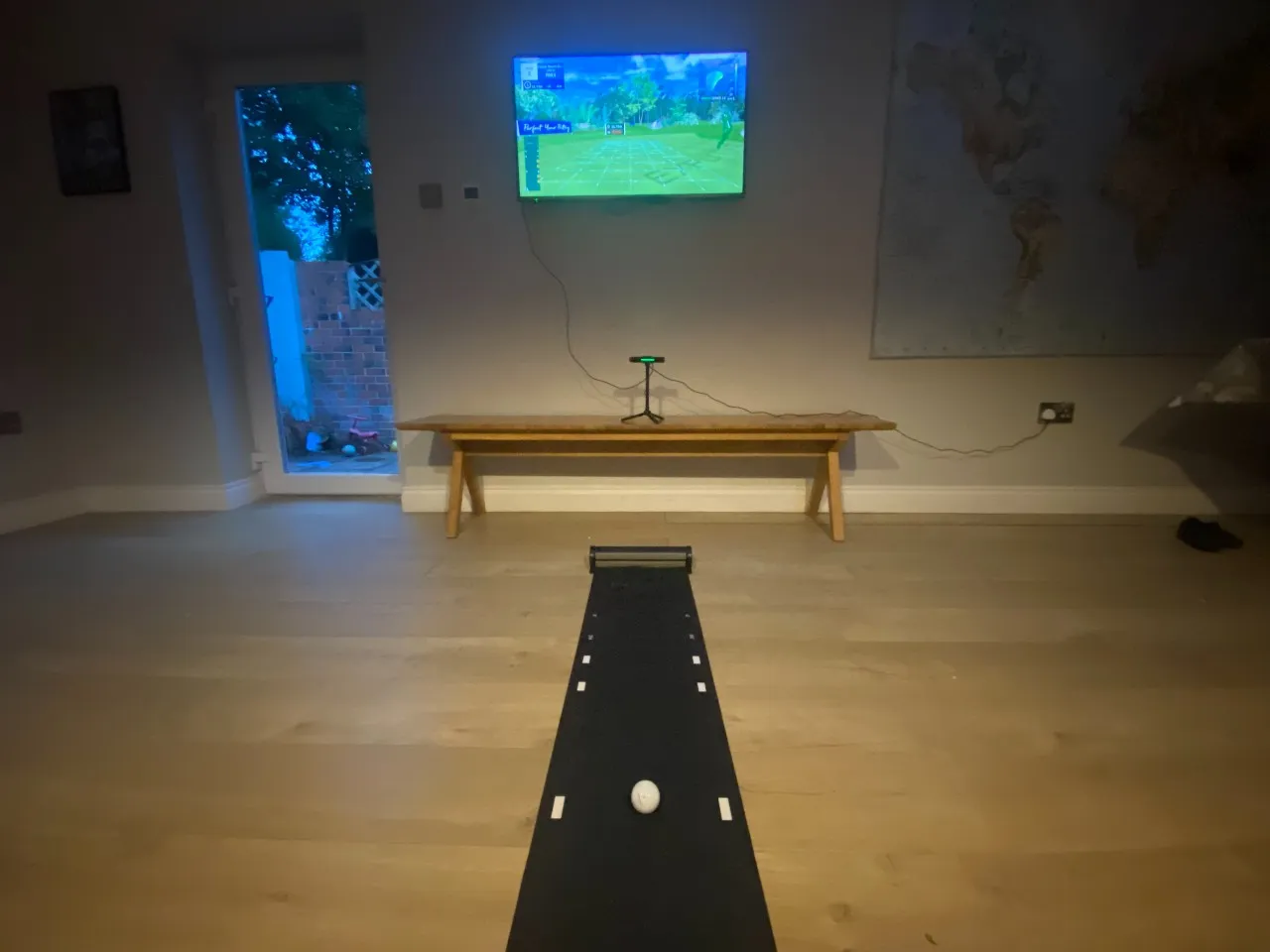
The Exputt RG can do wonders for your putting
It’s not just your driving and iron play that you want to sharpen up in the comfort of your own home, is it? How can you practice your putting stroke at home?
You can complete your home set-up with a putting simulator - specifically the Exputt RG putting sim.
Just roll out the mat, attach it to an HDMI port and position the high-speed camera, either on top of your TV or free standing via the tripod, to allow it to sync up with the mat.
This is a fantastic and innovative piece of kit that offers incredible feedback on your stroke as well as encouraging you to work on your putting through a number of games and stunning courses.
It’s an extra that will cost you in the region of $530, but has to be one of the best products out there that allows you to really graft away on your putting stroke - plus it’s also very good fun.

Putting mats are one of the most popular home golf accessories
There are other ways to work on your stroke, of course, without forking out another significant sum of money: simple putting practice mats and training aids.
We’ve tested the best putting practice mats on the market, our favorite to date being the Perfect Practice Putting Mat. We tested the 9ft version, although there is a smaller model for those with less room to play with.
It features plenty of lines and checkpoints to help you with alignment and starting point, and once you sink the putt it’s returned to your feet via a wooden ramp. Hours of fun.

Of course, you don’t get the sim experience and data that the Exputt RG gives you, but that's not going to be essential for everyone - plus there are plenty of good putting mats out there for around $100 and less.
If you want the ability to practice breaking putts, the PuttOut Air Break and the Me And My Golf Breaking Balls putting mat are the stand out options.
Summary

Owing a simulator can allow you to play famous courses with your friends in the comfort of your own home
There are plenty of stories out there of the rich and famous - as well as tour players - investing tens of thousands of dollars on a home set-up, as well as their own short-game areas and mini courses.
If money is no object, you could spend upwards of six figures on your own swing studio, especially if you needed to build an extension.
However, for most club golfers, you can create a simple home set-up, either indoors (if you have the room) or outside for as little as $300, with a mid range practice net and mat.
The cost of the set-up will increase fairly significantly if you decide to add a launch monitor and/or simulator, although they are starting to become more affordable, and there are several options around the $1,000-mark.
Before you start filling your shopping basket with all kinds of kit, set yourself a budget and ask yourself what it is that you want to get out of your home set-up.

For a lot of golfers, having a fairly basic net and mat for the garden will be sufficient - good enough to warm-up in and work on the swing at home.
If you want to go to the next level and get lots of swing and ball data, you’re looking at a minimum of another $1,000 or so; it sounds a lot, but how much would you be willing to spend on a new set of irons?
Playing virtual golf on world-famous golf courses and enjoying games like nearest the pin and long drive challenges with your mates are one of the biggest attractions of simulators - but the very best sims run into the many thousands.
Fingers crossed for those lottery numbers.
